
Free
Change the date in a PDF
To change the date in a PDF with FontiaPDF, open it, click the line where the date appears and type the new one; if it shows up in several places, “Search” and “Replace all” update every copy at once. When you download, the corrected date is written in the same font, size and color as the rest of the document.
The same goes for an amount, a name or a reference number. It is meant for correcting your own documents or ones you have the right to change: a certificate you issued with the wrong day, one of your invoices that has to go out again with a new due date, a meeting notice whose date has changed.
A real example
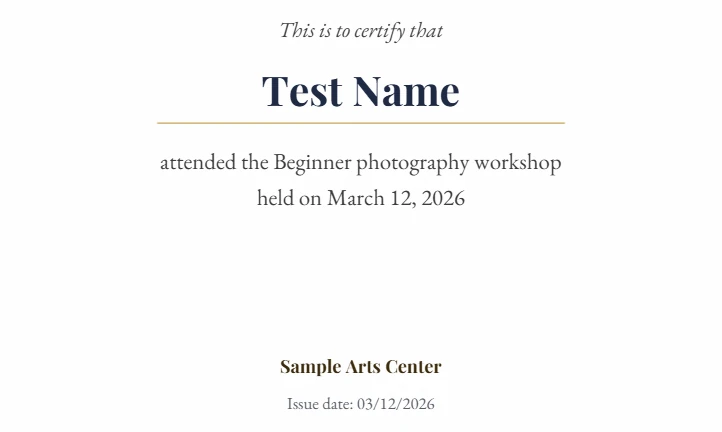
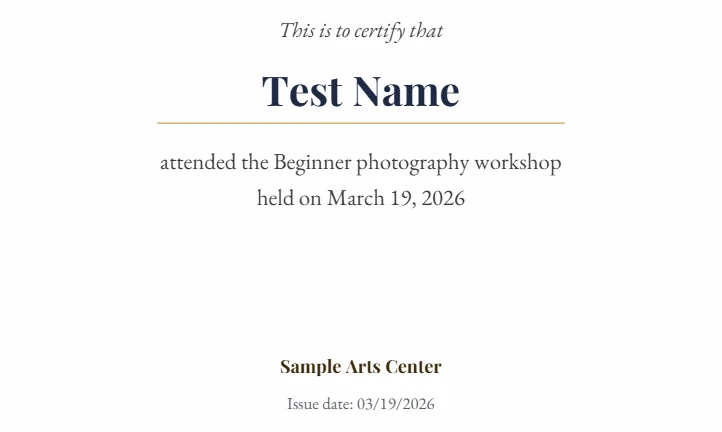
A “Certificate of attendance” made out to “Test Name” has the date in two places and in two formats: “March 12, 2026” in the body and “Issue date: 03/12/2026” at the bottom. Both are changed to the 19th and the PDF is downloaded. When it is opened again, both dates read 19, set in the same typeface as the rest of the certificate.
Before
After
How to change a date in a PDF in 3 steps
-
Find every occurrence
Open the PDF (up to 50 MB) and press “Search” or Ctrl+F. Search for the date in each format the document uses, such as “March 12, 2026” and “03/12/2026”: the counter shows how many times it appears across all pages.
-
Replace them
Type the new date in “Replace with…” and press “Replace all”, or “Replace” to go through them one at a time. If the date only appears once, just click the line and fix it.
-
Check and download
Go through the pages to make sure no old date is left over, for example in a table or a footer, then hit “Download PDF”.
Before you replace: avoid changing too much
- Search for the full date, not just the day: replacing “12” would also change an amount like $12.00 or a reference number that contains it.
- With “Whole word” on, “12” no longer matches “120” or “2012”, but it still matches “12.00” and the 12 in “03/12”, which is why searching for the whole date is safer.
- One document can write the same date in several ways (“March 12”, “03/12/2026”, “12 March 2026”, “Mar 12”): run one search per format.
- Watch the capitals with names: without “Aa”, searching for “Test Name” also finds “TEST NAME”, and the replacement is written exactly as you typed it. If the document uses both forms, turn on “Aa” and replace each one separately.
- With amounts, remember that a PDF doesn’t calculate anything: if you fix one line of an invoice, the total and the tax don’t update themselves, so change them too.
- Search works within each line: a date that is split across two lines of the PDF won’t show up as a match, so fix it by hand.
- If you make a mistake, a single Ctrl+Z undoes the whole “Replace all”.
What it is for, and what it isn’t
FontiaPDF is for correcting documents that are yours or that you have the right to modify: a certificate you issue, your own invoice, a letter or a form you are preparing. It is not for forging documents or altering ones issued by another person or an institution; doing so can have legal consequences.
It is not the tool for digitally signed documents either. A certified digital signature guarantees that the file hasn’t changed since it was signed, so any edit invalidates it. On top of that, FontiaPDF rewrites the whole file when you download and doesn’t keep digital signatures, so the resulting PDF will no longer be signed. If a signed document contains a mistake, ask whoever signed it to issue a corrected one.
The date on the page is not the file’s date
What you change here is the date people read on the page. A PDF’s document properties also store dates of their own, the creation date and the modified date, and FontiaPDF doesn’t let you edit those. When you download, the creation date is kept (unless you also rotate or delete pages in that same download) and the modified date becomes the moment you exported. If what you need is to change those properties, this tool won’t do it.
What’s preserved and what isn’t
Preserved
- The font, size and color of the date, as long as the typeface is embedded in the PDF and has every character you type: digits, slashes and the letters of the month.
- The position of the line and everything you didn’t touch: logos, stamps, drawn signatures and the rest of the pages.
- Text stays text: the new date can be selected, copied and searched in the downloaded PDF.
Limits
- Digital signatures are not kept: the PDF you download is no longer signed.
- If the new month is longer (“May” to “September”), the line grows to the right; the text doesn’t reflow.
- A date that is part of an image, such as a scanned stamp, isn’t text: you can only cover it with whiteout and type over it.
- In a scanned PDF you first have to recognize the text with the editor’s OCR; the corrected date is then written in a standard font over a paper-colored patch.
Free or Premium
Free
20 exports a day, no sign-up and no watermark.
- Edit dates, amounts and names
- Find and replace across the document
- Whiteout to cover details that are images
Premium
Unlimited exports and extra features.
- Unlimited exports
- Reorder, duplicate and extract pages from the panel
- Password-protect the PDF
Frequently asked questions
Can I change the date on a signed PDF?
If it carries a digital signature with a certificate, any change invalidates it, and FontiaPDF doesn’t keep digital signatures when you download: the PDF would no longer be signed. Ask whoever signed it for a corrected version. If the signature is just an image, the text can be edited, but only do it if you have the right to change that document.
Does it change the file’s creation date too?
No. FontiaPDF changes the text on the page, not the PDF’s document properties: the creation date is kept (unless you also rotate or delete pages in that same download) and the modified date becomes the time of the export.
How do I change a date that appears on every page?
With “Search” and “Replace all”: it changes every match in the document, on any page, and a single Ctrl+Z undoes all of them. If the date appears in different formats, repeat the search for each one.
Is it free?
Yes. Editing text and find and replace are in the free plan, with 20 exports a day, no sign-up and no watermark.
More tools
Ready to give it a try?
Upload your PDF and edit it in your browser, with no sign-up and nothing to install.
Open the editor