
Free
Edit a PDF on your phone
To edit a PDF on your phone with FontiaPDF, open fontiapdf.com in your phone’s browser, upload the file and tap the line you want to change: it opens for typing, with a formatting bar built for small screens. When you are done, you download the corrected PDF in its original font. There is no app to install and no account to create.
It is the same editor you get on a computer, with the controls rearranged for a narrow screen. It covers the jobs that tend to come up when you are away from your desk: fixing a detail before you forward a document, filling in a form or signing it.
A real example
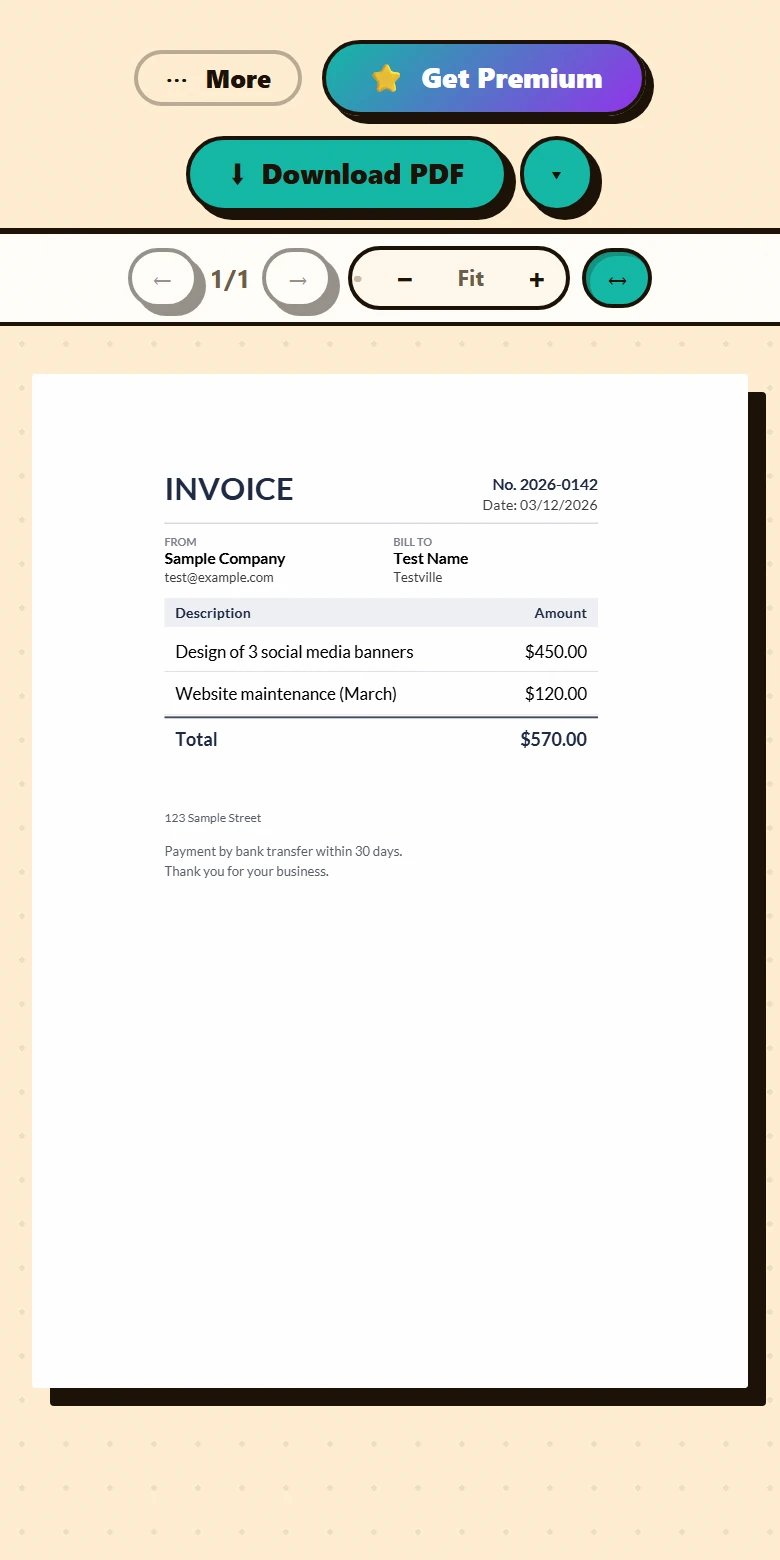
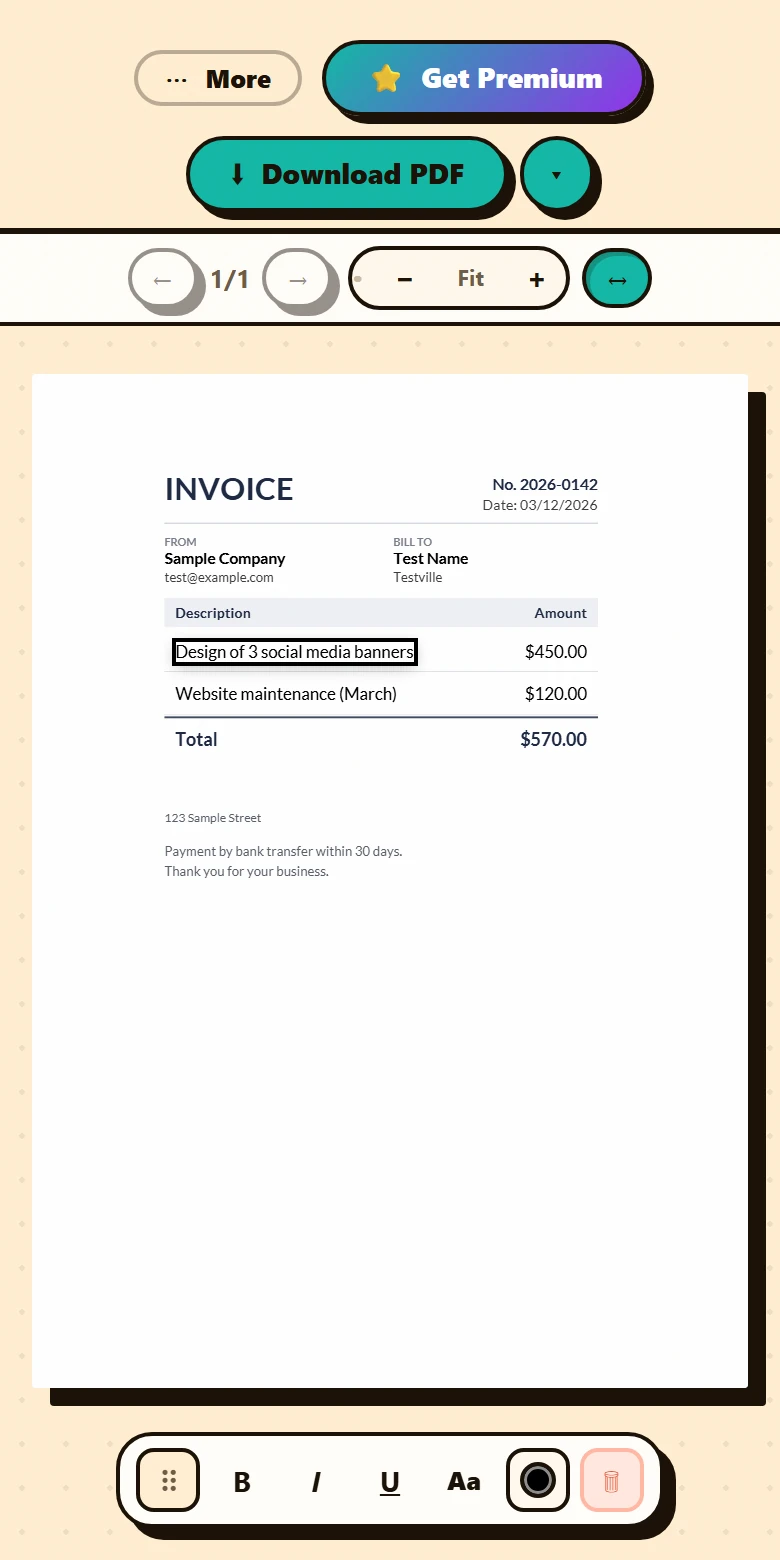
The sample invoice from “Sample Company” to “Test Name”, opened on a phone. When it loads, the page fits the width of the screen, so you can read all of it without scrolling sideways. A single tap on the line item opens it for editing, and the mobile floating toolbar appears with bold, italic, underline and the “Aa” button, which holds the font and size.
Before
After
How to edit a PDF on your phone in 3 steps
-
Open the editor and upload the PDF
In your phone’s browser, tap “Open the editor” on this page (or go to fontiapdf.com and tap “Start editing”), then “Select file” to pick a PDF saved on the phone, up to 50 MB. If the page doesn’t fit the width of the screen, the editor opens it fitted to it.
-
Tap the line and type
A tap opens the line for editing. The floating toolbar has B, I and U, the “Aa” button for font and size, the color and the trash can. To add new text, press and hold an empty spot and choose “Add text here”, or use “Add text” inside “⋯ More”. When you are done, tap outside the line: the first tap stops typing and a second one clears the selection.
-
Download the PDF
While you have pending changes, a bar at the bottom shows “N changes not downloaded” and a “Download” button. The edited PDF is saved wherever your browser keeps downloads, ready to share or attach.
Where everything is on a small screen
- On screens up to 600 px wide, the top toolbar shrinks to “⋯ More”, your plan badge and “Download PDF”.
- Inside “⋯ More” you’ll find “Load another PDF”, “Add text”, “Add image”, “Sign”, “Shapes”, “Search”, “Pages”, “Tools”, “Compress” and “Report a problem”, plus “Document images” when the PDF contains images.
- Zoom works with the − and + buttons, from 50% to 300%; the “↔” button (“Fit to width”) fits the page to the screen or returns it to its natural size.
- On the floating toolbar, “Aa” opens the font and size controls, which don’t fit in the main row on a phone.
- “Search” works just like it does on a computer: with “Replace all” you change a name or a date that repeats throughout the document without going line by line, which saves a lot of tapping on a small screen.
- The “Pages” panel and the tools for merging, splitting or numbering pages take up almost the whole screen; in file lists, the ↑, ↓ and ✕ buttons reorder and remove items without any dragging.
If the browser closes the tab
On a phone it is common to switch apps and have the browser discard a tab in the background. FontiaPDF saves a copy of your edit in the browser itself a few seconds after every change; when you open the editor again, it offers to “Recover” or “Discard” whatever you hadn’t downloaded. That copy never leaves the phone, and it deletes itself after 7 days without use or 24 hours after you download.
What still works better on a big screen
For quick corrections, a phone is all you need. Some jobs, though, are still more comfortable on a computer:
- Proofreading documents full of small text or dense tables: even when you zoom in with +, a narrow screen means more scrolling to check the result.
- Moving or resizing text, an image, a signature or a shape, and drawing shapes such as whiteout or highlights: today that is done by dragging with a mouse or trackpad, and it doesn’t respond to a finger. For new text, press and hold exactly where you want it and choose “Add text here”: it is created at that spot.
- Undo and redo use the keyboard (Ctrl+Z and Ctrl+Shift+Z), and there is no undo button on a phone, so if you get a line wrong, tap it again and fix it.
What’s preserved and what isn’t
Preserved
- The font, size and color of every edited line, just as on a computer: the PDF you download from your phone goes through the same process.
- Almost all of the editor’s tools are still there; on a phone they are grouped under “⋯ More”.
- Your document stays on the phone while you edit: it only travels to our server when you download with changes, compress, extract pages or edit document images, and it is discarded when that is done.
Limits
- You need an up-to-date browser; OCR for scans also needs WebAssembly support.
- Downloading a PDF with changes needs a connection, because the changes are applied on our server.
- To zoom into the document, use − and +: pinching is the browser’s own gesture and zooms the whole web page, toolbars included.
- The limits are the same as on a computer: 50 MB per PDF and 20 exports a day on the free plan.
Free or Premium
Free
20 exports a day, no sign-up and no watermark.
- Edit and add text from your phone
- Sign, fill in forms and search
- Merge, split and number pages
Premium
Unlimited exports and extra features.
- Unlimited exports
- Reorder, duplicate and extract pages from the panel
- Password-protect the PDF
Frequently asked questions
Do I need to install an app?
No. FontiaPDF works in the browser you already use on your phone, with nothing to install and no sign-up. You open the site, upload the PDF and edit it right there.
Can I sign a PDF on my phone?
Yes, and it is free: in “⋯ More”, tap “Sign” and, in “Add signature”, draw it with your finger, type it or upload an image of your signature. The signature lands in the middle of the page and can’t be dragged on a phone, so if it has to sit on a specific line, place it from a computer.
Where does the downloaded PDF end up?
Wherever your browser saves downloads, usually the phone’s downloads folder. From there you can open it, share it or attach it to an email.
Is my file uploaded to a server?
Not while you edit: the PDF stays in your phone’s browser. When you download with changes, it travels encrypted to our server, is processed in memory and is discarded as soon as that is done, with no copies kept.
Is it free on a phone?
Yes, on the same terms as on a computer: 20 exports a day, with no sign-up and no watermark.
More tools
Ready to give it a try?
Upload your PDF and edit it in your browser, with no sign-up and nothing to install.
Open the editor